

Understanding PHP Opcache
PHP Opcache is a performance optimization extension that caches compiled PHP code, eliminating the need to parse and compile scripts on every request. While this significantly improves performance, it can cause issues when you deploy new code that doesn't reflect in your live application. Understanding how to flush Opcache is essential for development and troubleshooting. Cached code persists until you explicitly clear it or the cache expires naturally.
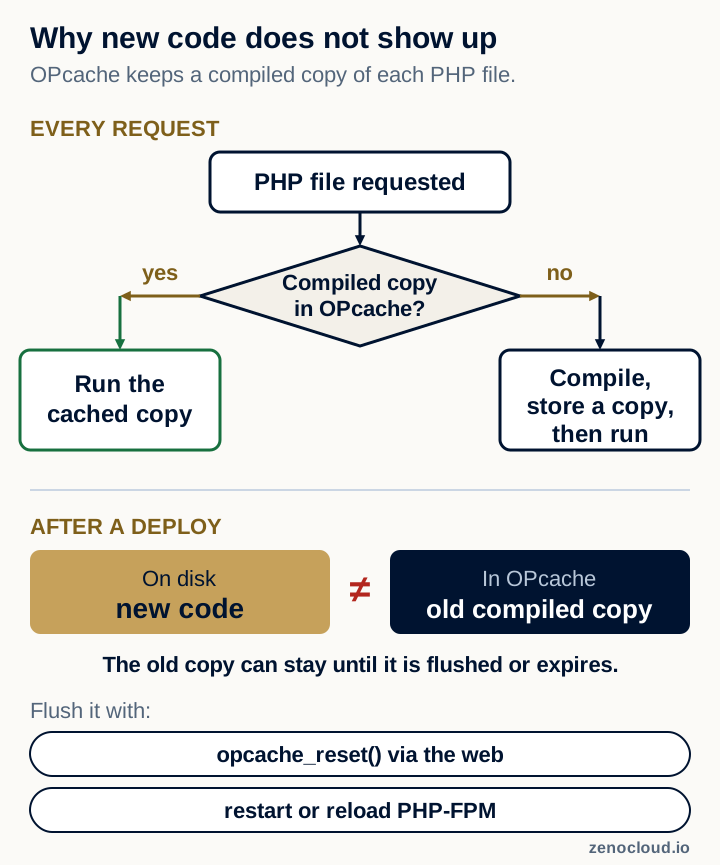
Method 1: Using opcache_reset() in PHP
The simplest method is creating a small PHP script. Create a file called "reset-cache.php" in your web root:
<?php<br/>opcache_reset();<br/>echo "OPcache has been reset";<br/>?>
Access this file through your browser (yoursite.com/reset-cache.php) to flush the cache immediately. After confirming success, delete this file for security reasons, as leaving it accessible allows anyone to clear your cache. For shared hosting environments, this method works well as it doesn't require command-line access.
Method 2: From the Command Line (CLI and PHP-FPM Have Separate Caches)
If you have SSH access, it is tempting to run php -r 'opcache_reset();'. That does not clear your website's cache. The php command runs in the command-line (CLI) process, which has its own OPcache (usually switched off), so it never touches the cache that PHP-FPM keeps for web requests. A deploy script that only runs it will look as if it worked while visitors still get the old code.
To clear the cache your site actually uses, do one of these from SSH instead:
- Request the reset script from Method 1 over the web, for example
curl https://yoursite.com/reset-cache.php, then delete it. - Use cachetool against the PHP-FPM socket, for example
cachetool opcache:reset --fcgi=/var/run/php/php8.3-fpm.sock(use the socket path from your PHP-FPM pool configuration). - Reload or restart PHP-FPM (see Method 3).
Any of these can go into an automated deployment script.
Method 3: Restart PHP-FPM Service
For servers running PHP-FPM, restarting the service clears Opcache completely:
sudo systemctl restart php-fpm
Or for specific PHP versions:
sudo systemctl restart php7.4-fpm
This approach guarantees complete cache clearance but temporarily interrupts PHP processing. Use this method during maintenance windows or when other methods fail. For development environments where brief interruptions are acceptable, this is the most reliable approach.
With root access on a ZenoCloud VPS, you can restart PHP-FPM yourself as part of every deploy.
Method 4: Using cPanel Clear Functions Cache
If you're on cPanel hosting, the control panel provides built-in cache clearing. Log in to cPanel and look for "PHP Pecl" or "PHP Config" sections. Some versions include a "Clear Functions Cache" option that clears Opcache directly. This method is hosting-specific, so refer to your provider's documentation for exact steps.
Method 5: Manual Opcache Directory Clearing
On Linux servers, Opcache stores files in a directory that you can manually clear. Typically found at /tmp or /var/run/opcache, you can delete these files directly:
sudo rm -rf /tmp/php-opcache/*
This approach requires root or sudo access. Always verify the correct cache directory for your system before deleting files. After clearing, PHP re-compiles code on the next request, rebuilding the cache with current code.
Method 6: Add Cache-Busting Headers
Prevent caching issues proactively by adding headers that discourage caching during development. Add to your .htaccess or server config:
Header set Cache-Control "no-cache, no-store, must-revalidate"<br/>Header set Pragma "no-cache"<br/>Header set Expires "0"
Remove these headers in production. This approach prevents caching issues before they occur, making development smoother.
When to Flush Opcache
Flush Opcache after deploying new code to ensure changes take effect immediately. Clear it when updates aren't appearing despite code modifications. Do this during development when making frequent changes. Flush after updating plugins or extensions. Consider clearing it as part of your automated deployment process.
Configuring Opcache for Development
In your php.ini file, you can disable Opcache entirely during development by setting opcache.enable=0, or set a shorter cache expiration time with opcache.revalidate_freq=0 to check files every request. These settings reduce cache-related confusion during active development. Remember to re-enable normal caching in production for optimal performance.
Conclusion
Mastering Opcache flushing ensures your deployed code works as expected without cache-related mysteries. Whether using PHP functions, command-line tools, or service restarts, you now have multiple methods to clear cached code. Integrate cache clearing into your deployment process to maintain smooth development workflows and reliable updates.