

This is for engineering and ops leads running production AWS workloads at $5,000 a month or more, who need a cost review that does not risk an incident to save a few hundred dollars. If you are staring at a Cost Explorer bill that grew faster than your traffic, this is the checklist we run before touching a single instance.
Answer capsule: The highest-yield AWS cost checks are, in order of typical impact: EC2 rightsizing and scheduling, idle EBS and RDS cleanup, S3 storage tiering, NAT Gateway and load balancer audits, Spot Instance adoption for fault-tolerant workloads, and a 1-year no-upfront Compute Savings Plan. Run Cost Explorer's Resource Optimization report first; it tells you where to start.
AWS published a version of this checklist as 10 things you can do today to reduce AWS costs back in April 2020. The underlying levers have not changed since, but the tooling has: Compute Optimizer, S3 Storage Lens, and DynamoDB on-demand pricing are all more capable now than they were then. We rebuilt the checklist against the current AWS documentation and our own experience running production accounts, and we separated the checks that are safe to automate from the ones that need a human to sign off.
What is an AWS cost audit and where should it start?
An AWS cost audit is a structured review of billing data, resource utilization, and commitment coverage across every linked account, done to find spend that does not correspond to current business need. It starts in AWS Cost Explorer, filtered by linked account and service, over a trailing 30 to 90 day window, before any instance gets touched.
Open Cost Explorer and group by Service, then by Linked Account if you run AWS Organizations. In our reviews, three services usually account for 70 to 85% of total spend: EC2, RDS, and data transfer (which includes NAT Gateway processing charges). Set an AWS Budgets alert at 80% of your monthly forecast before you start cutting anything, so a legitimate traffic spike does not get mistaken for a leftover test instance mid-audit. The AWS Cost Management documentation covers the exact filter and grouping options.
Which EC2 instances are silently wasting money?
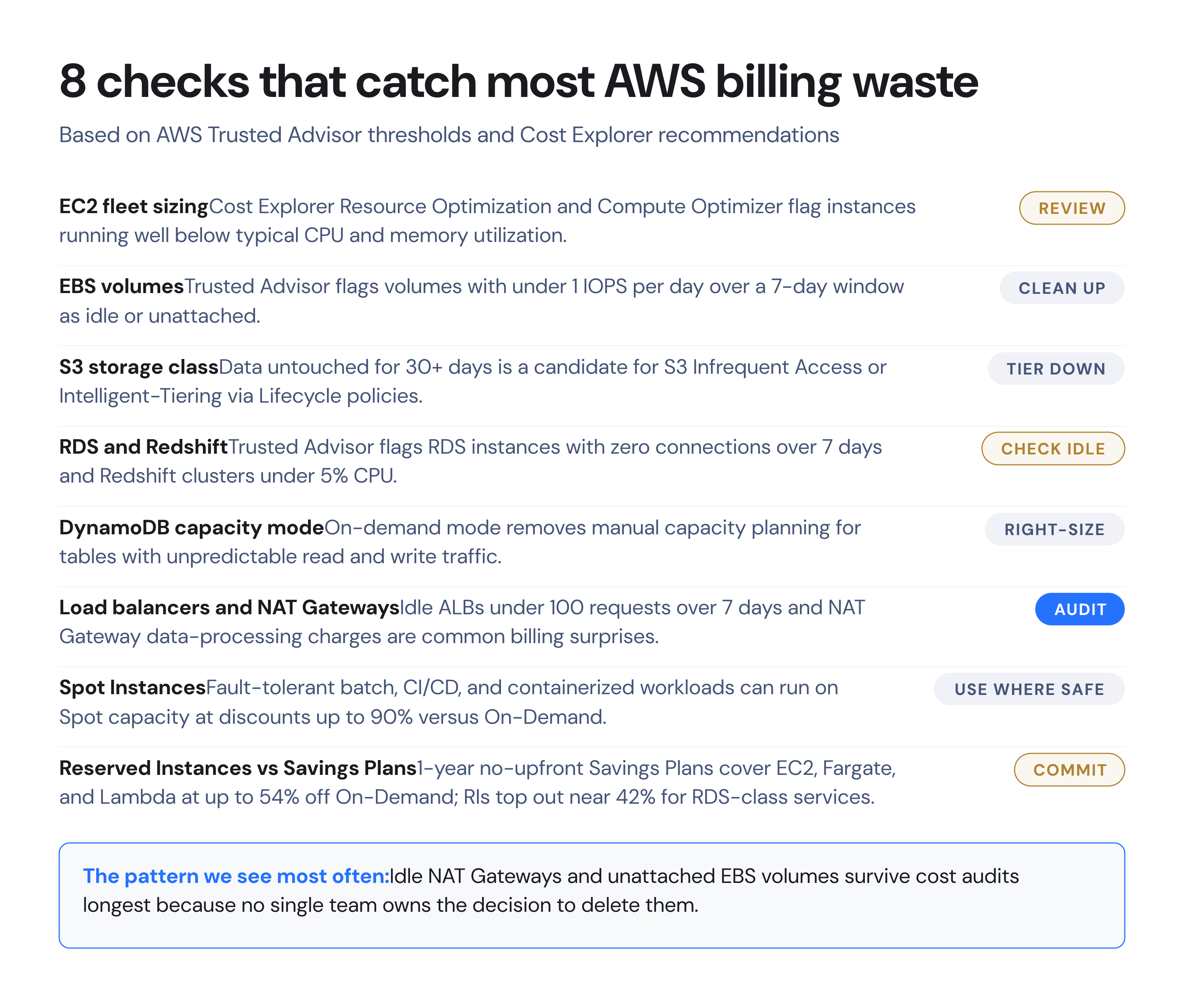
EC2 instances waste money when their provisioned size does not match sustained CPU, memory, or network usage, which AWS Compute Optimizer flags using 14 days of CloudWatch utilization data. The fix is downsizing, stopping, or scheduling the instance, not necessarily switching families, and it is the single check that produces the most immediate, lowest-risk reduction.
Cost Explorer's Resource Optimization report and Compute Optimizer both surface instances running under typical thresholds (commonly under 10% average CPU sustained over two weeks). Before resizing anything in production, we pull memory utilization too, since CPU alone misses memory-bound workloads like caching layers and JVM services. For non-production environments, AWS Instance Scheduler will stop dev and staging instances outside business hours automatically; a fleet that runs 12 hours a day instead of 24 cuts that fleet's EC2 spend by 50%, before any rightsizing. We have seen teams skip this because scheduling requires touching CI/CD pipelines that reference instance state, so budget half a day of engineering time to test it against your deploy process before rolling it out broadly.
How much do orphaned EBS volumes and snapshots cost?
Orphaned EBS volumes are unattached or nearly idle disks that keep billing at the standard per-GB-month rate even though no instance reads or writes to them. AWS Trusted Advisor flags any volume with under 1 IOPS per day, averaged over 7 days, as a low-utilization candidate for deletion or snapshot-and-remove.
A single unattached 500 GB gp3 volume in ap-south-1 bills continuously regardless of use. Trusted Advisor's low-utilization check is available on Business and Enterprise support plans; on Basic or Developer support, you can get the same signal by querying CloudWatch VolumeReadOps and VolumeWriteOps directly. Before deleting anything, create a snapshot through Amazon Data Lifecycle Manager so the data is recoverable if someone asks for it in 90 days. In our account reviews, EBS volumes left behind by terminated EC2 instances (because DeleteOnTermination was set to false) are the most common source of this waste, and they are invisible unless someone is specifically looking for unattached volumes.
When should S3 data move to Intelligent-Tiering or Glacier?
S3 data should move out of Standard storage once access patterns show it is not being read regularly, which S3 Storage Lens and S3 Analytics can establish from 30 or more days of access logs. Objects with unpredictable access patterns belong in S3 Intelligent-Tiering; objects with known, infrequent access belong in a Lifecycle policy that moves them to Standard-IA or Glacier on a fixed schedule.
Standard-IA pricing runs roughly 45% below S3 Standard per GB-month in most US and ap-south-1 regions as of AWS's published rate cards, with a retrieval fee and a 30-day minimum storage duration, so it only pays off for data you are confident will not be pulled back within a month. Intelligent-Tiering removes that guesswork by moving objects automatically between access tiers and charging a small monitoring fee per object instead of requiring you to predict access patterns up front. We default new application buckets that store user uploads or logs to Intelligent-Tiering from day one, because retrofitting Lifecycle rules onto years of accumulated objects means running a one-time inventory and analytics pass before any policy can be trusted.
Are idle RDS and Redshift instances still billing you?
Idle RDS instances and underused Redshift clusters bill at full instance-hour rates whether or not an application is connected. Trusted Advisor's idle DB instance check flags RDS instances with zero database connections over a 7-day window, and Redshift clusters running below 5% CPU utilization are candidates for pausing.
RDS instances can be stopped (not terminated) for up to 7 days at a time before AWS automatically restarts them, which works for pre-production databases that only need to run during a deploy or test cycle. Redshift clusters support an explicit pause-and-resume action that stops compute billing while retaining the cluster configuration and data, which is the correct move for a reporting cluster that only runs monthly close jobs. We have seen staging RDS instances left running for months after a project shipped, because nobody owned the decision to decommission the database once the application was live, which is exactly the kind of check that belongs in a recurring monthly review rather than a one-time audit.
How does DynamoDB capacity mode affect the bill?
DynamoDB capacity mode determines whether you pay for provisioned read and write capacity units regardless of use, or pay per request under on-demand pricing. Tables with unpredictable or spiky traffic should run in on-demand mode; tables with steady, forecastable throughput are usually cheaper under provisioned capacity with AutoScaling attached.
Monitor ConsumedReadCapacityUnits and ConsumedWriteCapacityUnits in CloudWatch against your provisioned limits over at least two weeks. A table provisioned for peak traffic that only sees that peak for 2 hours a day is paying for 22 hours of unused capacity daily under fixed provisioning. On-demand pricing charges roughly 6 to 7 times more per request-unit than provisioned capacity at full utilization, so the crossover point matters: on-demand wins for spiky or new workloads where you cannot forecast traffic yet, and provisioned-with-AutoScaling wins once traffic is predictable enough to set sensible scaling thresholds. Treat this as a per-table decision, not an account-wide default.
Which load balancers and NAT Gateways should be reviewed?
Load balancers and NAT Gateways generate two distinct kinds of waste: idle balancers that still bill hourly with no traffic, and NAT Gateway data-processing charges that scale with every gigabyte of outbound traffic regardless of whether that traffic needed to leave the VPC. Trusted Advisor flags ALBs and NLBs with under 100 requests over a 7-day window as idle.
NAT Gateway pricing includes both an hourly charge and a per-GB data-processing fee, and in accounts we have reviewed, NAT Gateway data-processing charges are consistently the least-understood line item on the bill because engineers configure a route table once and never revisit it. A common fix is routing S3 and DynamoDB traffic through VPC Gateway Endpoints instead of NAT Gateways; Gateway Endpoints carry no hourly or data-processing charge for that traffic. If your architecture runs multiple NAT Gateways across Availability Zones for redundancy, confirm that route tables are not sending cross-AZ traffic through a single NAT Gateway unnecessarily, which adds both NAT processing fees and cross-AZ data transfer charges on top of each other.
When do Spot Instances make sense for production workloads?
Spot Instances make sense for workloads that tolerate interruption with a 2-minute warning: batch processing, CI/CD runners, containerized services behind a load balancer with enough replicas to absorb a lost node, and stateless big-data jobs. They do not belong under a single-instance production database or any workload without a graceful way to handle sudden termination.
Spot pricing floats with supply and demand but AWS advertises savings up to 90% versus On-Demand for the same instance type, per the EC2 Spot Instances pricing page. The safer production pattern is an EC2 Auto Scaling group with a mixed-instances policy: a baseline of On-Demand or Reserved capacity to guarantee availability, topped up with Spot capacity for burst load. We configure Spot allocation strategy as capacity-optimized rather than lowest-price for anything customer-facing, because chasing the cheapest Spot pool across many instance types increases interruption frequency, and a 5% price difference is not worth an unplanned reschedule during a traffic spike.
Reserved Instances or Compute Savings Plans: which discount is larger?
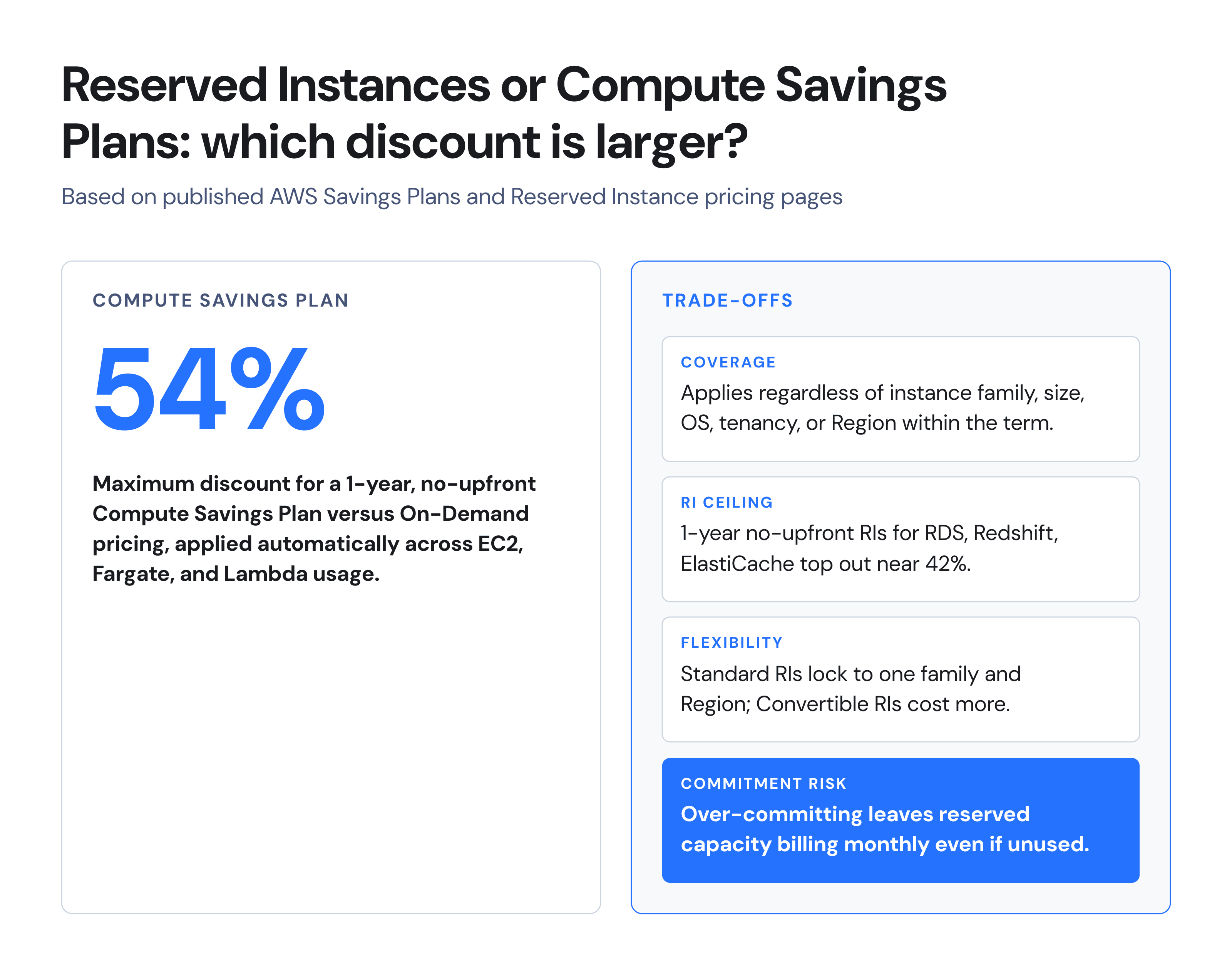
The larger discount is the 1-year no-upfront Compute Savings Plan, at up to 54% off On-Demand pricing, applied automatically across EC2, Fargate, and Lambda usage regardless of instance family, size, OS, or Region within the commitment term. Reserved Instances top out near 42% for RDS, Redshift, ElastiCache, and OpenSearch Service under the same 1-year no-upfront terms.
| Program | Max discount (1-yr, no upfront) | Covers | Flexibility |
|---|---|---|---|
| Compute Savings Plan | Up to 54% | EC2, Fargate, Lambda | Any family, size, OS, Region |
| Standard Reserved Instance | Up to 42% (varies by service) | RDS, Redshift, ElastiCache, OpenSearch | Locked to family and Region |
| Convertible Reserved Instance | Lower than Standard RI | Same services as Standard RI | Can change instance family mid-term |
For EC2, Fargate, and Lambda spend, a Compute Savings Plan should be the default commitment because it does not force you to lock in an instance family a year before you know whether you will still be running it. RDS, Redshift, and ElastiCache still require Reserved Instances since Savings Plans do not cover them, per the AWS Savings Plans pricing page. The risk on both programs is identical: a 1-year commitment against a usage forecast that turns out wrong leaves you paying for reserved capacity you no longer run, so we size the initial commitment against your lowest sustained usage over the trailing 3 months, not your current peak, and layer additional coverage in later once the baseline holds.
How much engineering time does a full cost audit take, and when is it cheaper to outsource it?
A full cost audit across EC2, RDS, EBS, S3, DynamoDB, load balancers, and NAT Gateways for a mid-size production account typically takes an experienced engineer 2 to 3 full working days, plus a recurring 2 to 4 hours a month to keep it current as the architecture changes. The decision to outsource it turns on whether that time is cheaper than the alternative: another internal hire, or a fixed monthly retainer.
At a loaded engineering cost of roughly $75 to $120 an hour for a senior DevOps engineer in India, 2 to 3 days of audit work costs approximately $1,200 to $2,880 (roughly ₹114,000 to ₹273,600 at $1 ≈ ₹95) in engineer-hours alone, before ongoing monthly upkeep. Compare that against a managed AWS operations retainer: ZenoCloud's managed plans start at $150 a month (approximately ₹14,250 a month), which covers ongoing monitoring and cost review rather than a one-time audit. The honest comparison is not the audit fee against the retainer fee; it is the fully-loaded cost of the engineer-hours you would otherwise spend on recurring cost reviews, weighed against hiring, on-call burden, and the opportunity cost of that engineer's time against product work. For a team already stretched thin on-call, a fixed monthly retainer removes a recurring task from the roadmap; for a team with spare senior capacity and a stable architecture, running the audit in-house on a quarterly cadence is the lower-cost option.
Key takeaways
- Start every review in Cost Explorer's Resource Optimization report, not with a manual instance-by-instance walk.
- EC2 rightsizing, EBS cleanup, and NAT Gateway routing produce the fastest, lowest-risk reductions.
- Compute Savings Plans (up to 54%) beat Reserved Instances (up to 42%) for EC2, Fargate, and Lambda; RIs remain the only path for RDS and Redshift discounts.
- Size any 1-year commitment against your lowest sustained usage over 3 months, not current peak.
- Budget 2 to 3 engineer-days for a first full audit, then 2 to 4 hours a month to keep it current.
FAQs
Can I reduce my AWS bill without changing instance families? Yes. Stopping idle instances, deleting orphaned EBS volumes, tiering S3 storage, and cleaning up NAT Gateway routing all reduce spend without touching instance family or size.
Do I need Business-tier AWS Support to use Trusted Advisor's cost checks? The core cost-optimization checks, including idle load balancers and low-utilization EBS volumes, require Business or Enterprise Support. Basic and Developer support plans get a limited set of checks; use CloudWatch metrics directly to replicate the rest.
Is a Compute Savings Plan always better than a Reserved Instance? For EC2, Fargate, and Lambda, yes, since the discount ceiling is higher and it is not locked to one instance family. Savings Plans do not cover RDS, Redshift, or ElastiCache, where Reserved Instances remain the only discount path.
How long should I monitor a resource before deciding it is idle? Use at least 7 days for Trusted Advisor-style checks and 14 days for Compute Optimizer sizing recommendations, to avoid mistaking a weekend lull or a batch job cycle for permanent idle capacity.
Will Spot Instances work for my production database? No, not for a stateful single-instance database. Spot Instances suit stateless, horizontally-scaled, or fault-tolerant workloads that can absorb a 2-minute interruption warning without data loss.
When does it make sense to hire a dedicated FinOps or DevOps engineer instead of using a managed provider? When your AWS footprint and headcount are large enough that a full-time role stays busy on infrastructure work beyond cost review, an internal hire can be cheaper long-term. Below that scale, the hire's idle time usually costs more than a managed retainer.
Does S3 Intelligent-Tiering ever cost more than Standard storage? It adds a small per-object monitoring fee, so for very small objects or objects accessed constantly, plain S3 Standard can be cheaper. It generally wins once object count and access unpredictability both rise.
If your last AWS cost review was more than a quarter ago, or you are weighing another DevOps hire against handing operations to a managed team, request an AWS cost audit from ZenoCloud Team at zenocloud.io.
Byline: ZenoCloud Team. Published August 2026. Last verified: August 2026.