
Learn how to download and restore data in cPanel-Acronis Backup Module.
- Recover/Download files from backups- Recover/Download databases from backups- Recovering Databases as New Ones
How to recover/download files from backups?
Follow the steps to recover data files in Acronis Backup Modules:
- Login to your cPanel account.- Search “Acronis Backup” in the search bar and click on “Acronis Backup” to list the available backups dates.- Click on the backup date from where you want to restore your files. Click on “Files”, it will list the files and directories.

- Select the files and you will be available to recover downloaded files.

If you select to “Recover” the files, it will restore the files in the same location.
Selecting “Download” will download the files on your local computer.
How to recover/download databases from backups?
Please follow the steps below to recover your databases from old backups using Acronis Backup Module.
- Login to your cPanel account.- Search “Acronis Backup” in the search bar and click on “Acronis Backup” to list the available backups dates- Click on the backup date from where you want to restore your files. Click on “Files”, it will list the files and directories

- Select the files and you will be available to recover downloaded files.
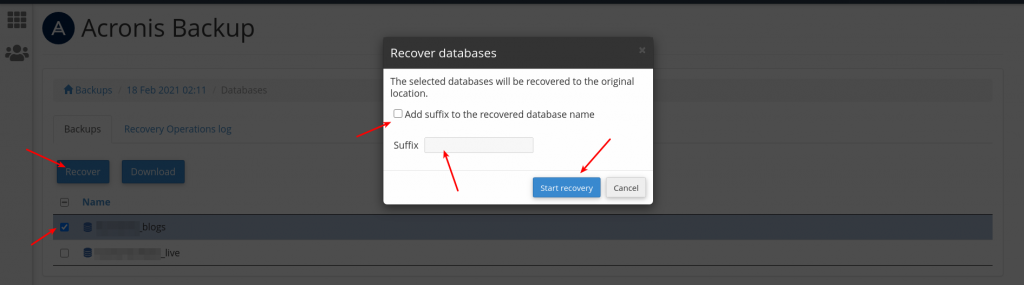
If you select to “Recover” the files, it will restore the files in the same location unless you check mark the suffix and add the suffix name.
Selecting “Download” will download the files on your local computer.
Recovering Databases as New Ones
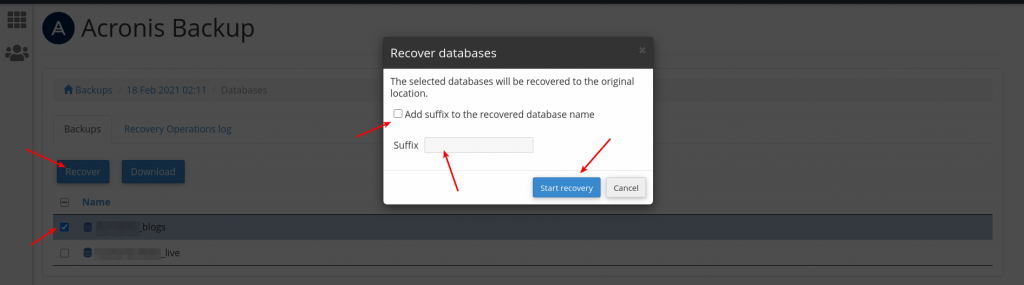
- Login to your cPanel account- Search “Acronis Backup” in the search bar- Click on “Acronis Backup” to list the available backups dates- Click on the backup date from where you want to restore your files- Click on “Files”, it will list the files and directories- Select the files and you will be available to recover downloaded files- Check mark the suffix and add the suffix name to create a new database
For more, you use the same above steps to recover/download the "Domains", "Mailboxes", "Mail forwarders" from the backups.
