
(user) plays a critical role in loading WordPress sites. By <a href=“https://serverguy.com/magento/why-cdn-is-a-must-for-faster-magento-store/\” class=“rank-math-link”>implementing CDN, you reduce the distance between the server and the user, and eventually, it leads to the fast loading of the page.
You can use <a href=“https://serverguy.com/comparison/best-cloudflare-alternative/\” class=“rank-math-link”>WordPress CDN plugins and free CDN service in the beginning.
#6 Implement Caching
Having caching implemented on the WordPress site is standard practice, and if you are not doing it, you are lagging behind the web norm.
<a href=“https://serverguy.com/wordpress/leverage-browser-caching/\” class=“rank-math-link”>Leverage browser caching to boost the speed of the site. There is <a href=“https://serverguy.com/kb/using-redis-cache/\” class=“rank-math-link”>Redis caching, memcaching, and server-side caching, you have to use them to adequately cached the site’s resources.
There are <a href=“https://breeze.io/blog/wordpress-caching-plugins/\” class=“rank-math-link”>WordPress caching plugins, such as WPRocket, W3 Total Cache, WP Fastest Cache, that you can use to enable it. Without the cache, the browser loads content from the webserver every time, and it puts the pressure on the server.
#7 Keeping WordPress Clean
WordPress is a powerful and most popular <a href=“https://serverguy.com/ecommerce/php-open-source-ecommerce-platforms/\” class=“rank-math-link”>PHP based platform to make sites and blogs. There are plugins for every other functionality, and that makes WordPress so beginner-friendly.
But cleaning WordPress is not that straight. Even after you uninstall the plugin, it will leave behind an enormous amount of chunks and cookies. That’s why you should not install plugins that you are not using. Because, they all make the platform mess up, and make it slow to run.
Keep the platform neat and clean, so it eats up fewer CPU resources.
#8 Monitor PHP Usage
WordPress is a PHP based platform, and the speed of the site is directly proportional to the speed of PHP. If heavy PHP scripts are running on the site, it will inevitably slow down the loading speed.
Please make sure the PHP is updated, and it is on the latest version. A website running on PHP 5 will have a slower server response time than the site running on the PHP 7.
Check out the PHP version your site has, and if it is not late, ask your hosting provider to upgrade it. Use the PHP compatibility plugin to find out the PHP version of your site.
<img src=“https://serverguy.com/wp-content/uploads/2020/08/php-compatibiitychecker.png\” alt=“PHP version checker” class=“wp-image-60206”/>

#9 3rd Party Scripts
Sometimes your WordPress website is slowing down due to the third party scripts.
Let’s say you embed a Tweet to the blog post. The browser will also send the request to Twitter to send the mentioned tweet. If the Twitter or the third party content you hosted on the page has a slow server, it will affect the performance of your website too.
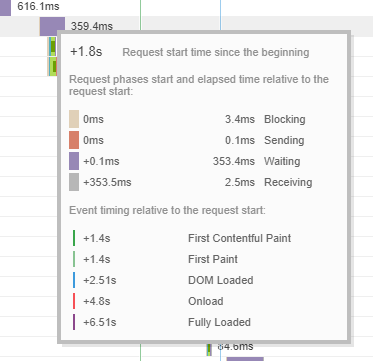
The server response time of the WordPress websites is only as fast as the slowest loading request on the page. Make every request fast, and the overall page will open faster.
FAQ
How do I speed up my WordPress site in 5 minutes?
You can speed up your WordPress website by <a href=“https://serverguy.com/learn/content-delivery-network/\” data-type=“post” data-id=“59585”>implementing a CDN and <a href=“https://serverguy.com/wordpress/leverage-browser-caching/\” data-type=“post” data-id=“60189”>caching plugin. Caching plugin makes a copy of the static website assets near the user. A CDN brings the database closer to the user. A WordPress website will see a noticeable boost in speed by adding a CDN and caching.
Conclusion
Server response time is a critical speed metric, and you have to reduce server response time to get the fast loading speed of the WordPress site.
In this post, I mentioned the ways you can do it. I hope this post helps you. If there is any other way to reduce server response time, leave it in the comment box.