WordPress is the most popular CMS right now, which makes it an attractive platform for hackers. Developers and web admins have to ensure that user’s data and login information is completely safe.
One of the small WordPress security measures is to add security questions to WordPress login screen.
This way, the users have to answer a security question along the username and password to log in.
This short post will show you how you can quickly add security questions to your WordPress site login page.
Why Add Security Questions to Login & Registration Forms in WordPress?
Brute Force attacks are one of the popular website hacking attacks. In it, the hacker tries to guess the username-password combination by testing a large number of guesses.
If the password is easy, then the supercomputers can easily crack the password. There are many ways to secure the WordPress login page from a Brute force attack, such as blocking IP, adding a captcha, changing login URL, etc.…
Adding security questions fails the brute force attack by adding one more dimension to guess. This increases the possible outcomes to such a large extent that running a Brute Force attack seems stupid.
A tiny security question can harden WordPress security a lot.
Website with large number of users, such as membership website, review website, etc., use security questions effectively to secure the accounts.
You can use it on your website too.
Adding Security Questions to Improve WordPress Login Security
You can add the security question to the WordPress plugin by installing a little plugin called WP Security Question.

You can check our guide to learn to install a WordPress plugin.
After activating the plugin, you have to configure the plugin setting.
Find the WP Security Question at the left navigation panel and click on it to open the configure page.

On the next page, you will see the question settings.
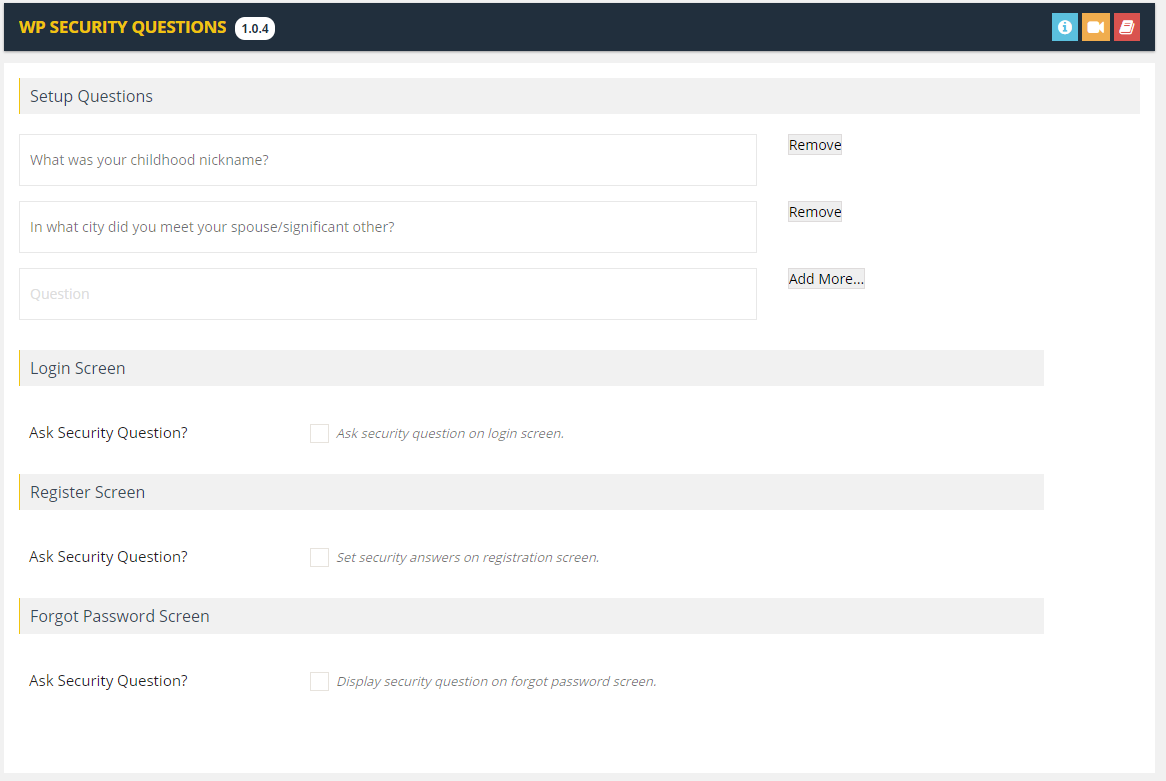
The plugin comes with premade questions already set up. You can remove them if you like.
Also, the WP Security Question plugin allows you to add your security questions to the WordPress login screen.
Type your question and click on ‘Add More.’
At the bottom, you will find the option to add the plugin on multiple pages.
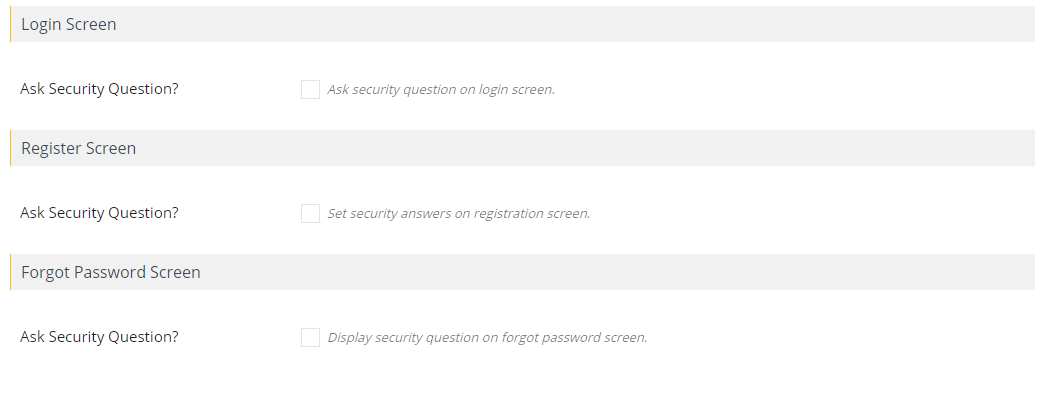
Tick the respective option to enable the question on the Login, Registration, and Forgot Password screen.
Click on the ‘Save Setting’ to save the changes.
What happens after enabling security question:
- Users on your site will be asked to select and answer the security question they assigned
- Registered users have to go to their profile page to set a security question
- Users with no security questions can log in with username and password
- New users have to set up security question while registering
- People who forgot their password have to answer the security question to reset it
Frequent Questions
Is WordPress login secure?
The WordPress login page and registration forms are secure but not invulnerable. You can tighten the security by adding a question to answer and captcha.
Also Read
- 8 Types of Image Files and When to use Them
- Best Online Grammar Checker Tools for WordPress
- WordPress Breadcrumbs? How to enable them
Wrap Up
WordPress security is critical, and you should be taking all the security measures. Another critical security option is WordPress hosting.
Never compromise and always take the quality hosting to host your website. Only with secure web hosting can you be sure of the safety of your website.
In this quick post, we learned to add security questions to the WordPress login screen. If there are any questions or doubts, you can ask them in the comments section.